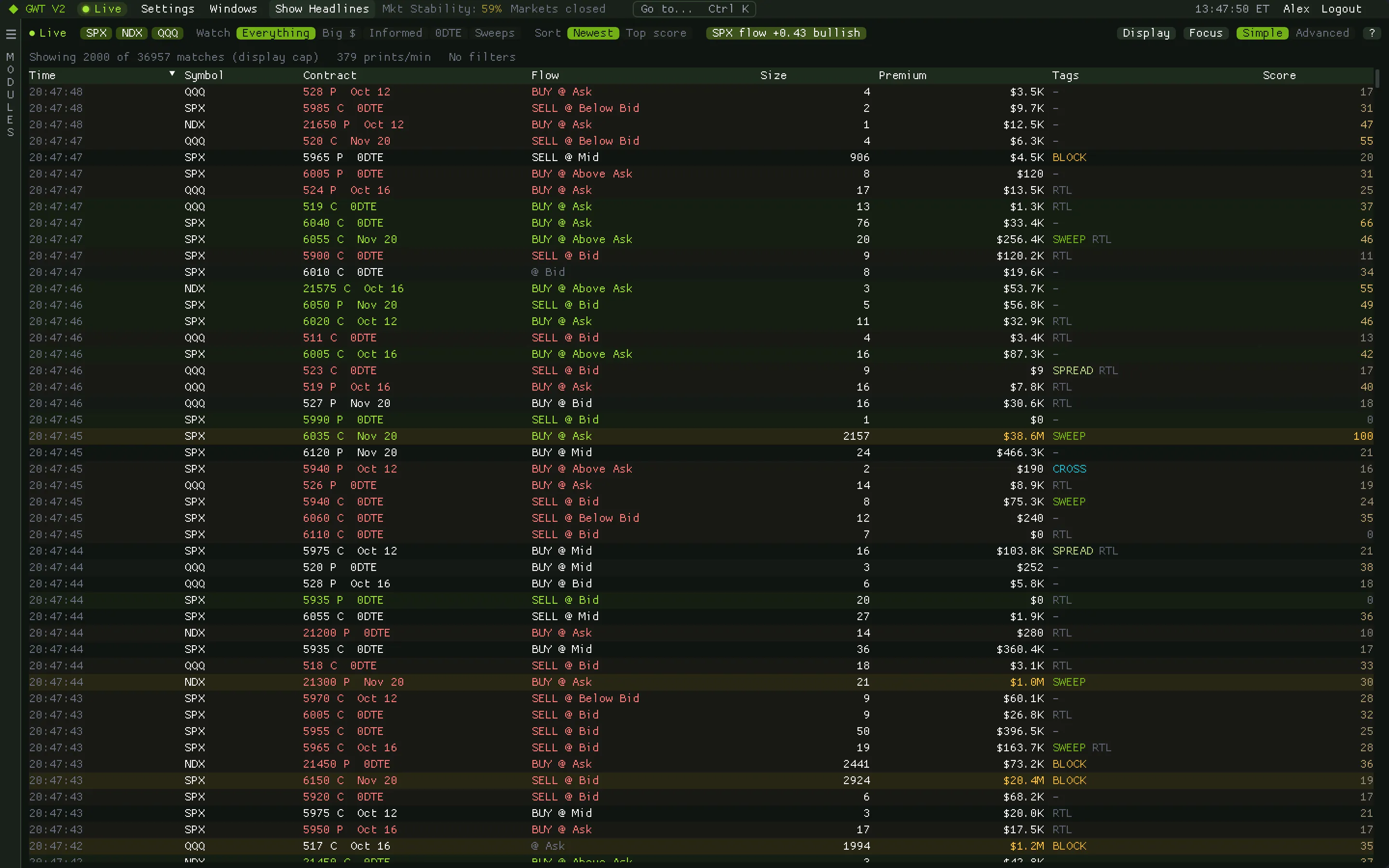
Every print. Scored for how informed it looks.
The tape lists every SPX, NDX and QQQ options print as it happens, and gives each one a score from 0 to 100. Higher means it looks more like deliberate, aggressive, opening positioning; lower means it reads more like hedging, closing or retail noise.
Screenshots: GWT V2 1.0.3 on simulated market data.
The score
Size matters. How it traded matters more.
The score starts from premium on a log scale, so a two-million-dollar print only modestly outranks a forty-thousand-dollar one on size alone. Then it weighs in what the execution reveals. It is computed once, when the print lands, and never changes.
Hover any score and the tooltip rebuilds exactly which boosts and discounts produced it, so you can judge whether you agree.
- Raises it: sweeps split across venues for speed, hitting at or through the quote, strikes near the money, size that is large against open interest, and implied volatility rich for the session.
- Lowers it: blocks, mid-market fills, prints with no clear aggressor, and retail-flagged prints.
- Highlights: rows light up at a score of 80 or a premium of a million dollars, and a live 80-plus print pulses briefly as it lands.
Simple and Advanced
Easy to start, deep when you need it.
Pick what to watch
Simple mode: choose the symbols and a Watch preset (Everything, Big $, Informed, 0DTE or Sweeps), then sort by newest or top score.
Read the flow pill
The pill shows the last 15 minutes' direction for a symbol; click it for the next one.
Go Advanced
Every filter, column and preset: Informed flow (score 70 and up), 0DTE informed, or non-retail sweeps for the purest urgency read.
Open Flow Pulse
The option volume imbalance over the last 15 minutes, with the dealer-gamma regime shaded behind it.
Flow Pulse
Direction and regime, together.
Flow Pulse turns the tape into one reading: the option volume imbalance, signed customer flow scaled from -1 to +1 over a rolling 15 minutes, with a separate non-retail read. Behind it, shading shows whether dealers were net long or short gamma from today's 0DTE prints.
How traders use itTreat the one-sided chip as a reason to look, not an entry: go to the tape, find the prints driving it, and check them against the regime.
- Fade. Dealers net long gamma: their hedging leans against moves, which tend to mean-revert.
- Follow. Dealers net short gamma: hedging moves with price, so moves tend to extend.
- One-sided. Lights up when the imbalance is strong and volume runs above the session's usual pace.
- Non-retail tick. The imbalance over non-retail prints only. When it disagrees with the headline gauge, it deserves the extra weight.
Keep exploring
Related modules
Ready when the open is
Put gamma, flow and liquidity on one screen.
Get your access token, download the app for your Mac or PC and paste the token at sign-in. It takes about two minutes.